
In this chapter, we will learn about WordPressGeneral Settings。WordPress General Settings are used to set the basic configuration settings for the site. In the Settings Management screen, it is the default settings screen.
Here are steps to access general settings-
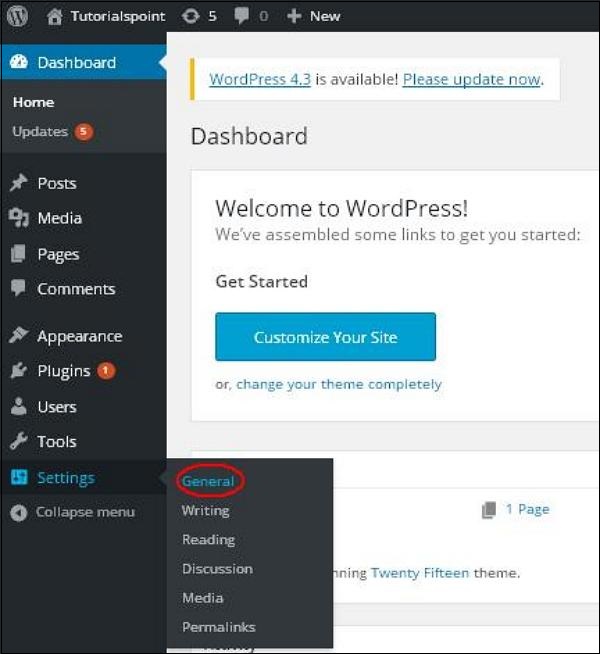
Step 1 - Click on WordPressSettings → GeneralOptions.
Step 2 - The General Settings page will be displayed, as shown in the snapshot below.
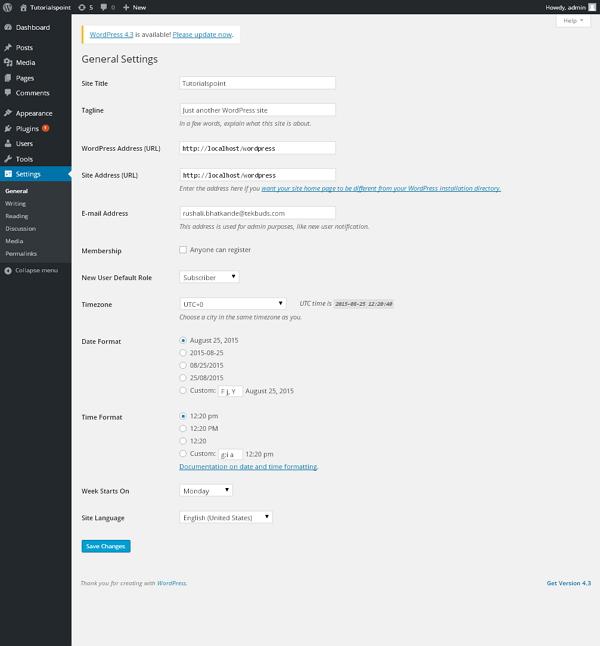
Following are details of the fields on the General Settings page.
- site title- It displays the name of the site in the template title.
- slogan- Display short sentences about your website.
- WordPress address (URL) - This is the URL of the WordPress directory where all core application files are located.
- Site address (URL) - Enter the site URL you want the site to appear on your browser.
- email address- Enter your email address, which will help recover your password or any updates.
- membership- By checking this check box, anyone can register an account on your website.
- Default role for new users- Set default roles for newly registered users or members.
- time zone- Set time zones based on specific cities.
- date format- Set the date format you need to display on the website.
- time format- Set the time format you need to display on the website.
- Week begins withSelect the working day on which you want the WordPress calendar to start. Monday is set by default.
- site language- Set the language of the WordPress dashboard.
Step3 - After filling in all information about general settings, click"Save changes"Button. It saves all your general setting information.