
Writing settings control the writing experience and provide options for customizing the WordPress website. These settings control the ability to add and edit posts, pages, and post types, as well as optional features such as remote publishing, publishing via email, and updating services.
Here are steps to access write settings-
Step (1) - To change writing settings, go toSetup → WriteOptions.
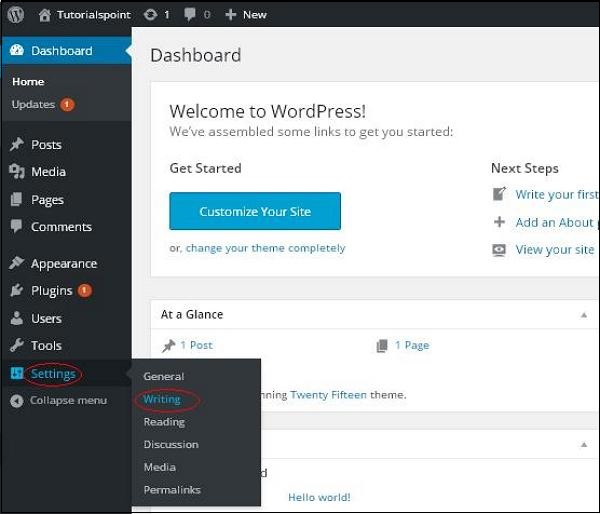
Step (2) - The composition settings page will be displayed, as shown in the following figure.
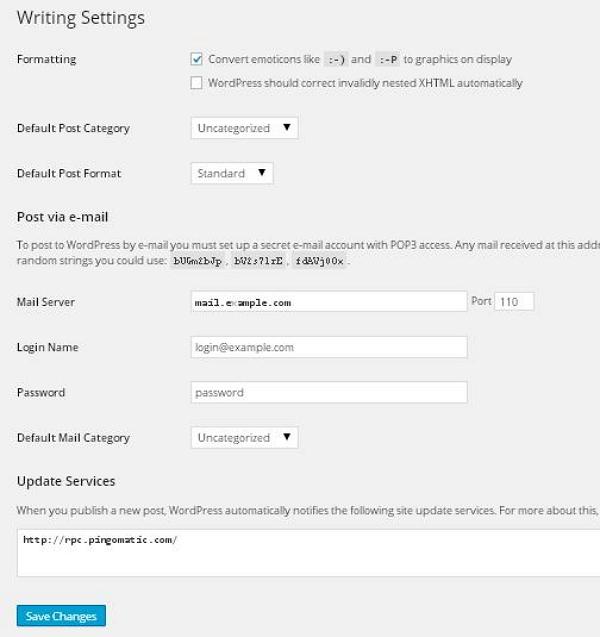
Below are details of the fields on the page.
- format- This field defines two sub-options for a better user experience.
- the first optionConvert emoticons such as:-) and:-P to displayedGraphics convert text-based emoticons to graphic-based emoticons.
- the second optionWordPress should correct invalid nested XHTML automaticallyCorrect invalid XHTML placed in posts or pages.
- Default post category- This is the category that applies to posts and you can leave it as"Unclassified"。
- Default post format- Themes use it to select the post format to apply to posts or create different styles for different types of posts.
- Post via email- This option uses the email address to create a post and post the post on your blog via email. To use this feature, you need to set up a secret email account with POP3 access, and any messages received at this address will be posted.
- mail server- It allows you to read emails you send to WordPress and store them for retrieval. To do this, you need to have a POP3-compatible mail server and it will have a URI address, such as mail.example.com, which you should enter here.
- login name- To create a post, WordPress will need its own email account. loginstarUse this e-mail address and should be kept confidential because spammers will post links that redirect to their own website.
- password- Set a password for the above email address.
- Default message category- It allows you to select custom categories for all posts posted through the email publishing feature.
- update service- When you post a new post, WordPress will automatically notify the site update service in the box. Please refer to the codeUpdate services to get a long list of possible services.
Step (3) - After filling in all the above information, click"Save changes"Button to save your information.