
In the past, if you wanted to make a book opening video, you needed to go through this process:
Find books → Read and organize → refine opinions → write scripts → find materials → dubbing → edit → add subtitles → publish.
For ordinary creators, the biggest threshold is not editing software, butContent organization and material preparation。
But now, with the help of AI tools, this process is being redefined.
Recently discovered a very simple method: use Gemini Notebook, upload an e-book and a book-opening video can be automatically generated within a few minutes.
There is no need for professional editing skills, and there is no need to prepare a large amount of material in advance.
The complete process is shared below.
1. Prepare a book you want to disassemble
First, you need an e-book.
You can choose your area of interest, such as:
- business management
- investment and wealth management
- psychology
- history
- technology trends
- personal growth
Take Poor Charlie's Bible for example.
recommended to prepare PDF formatBecause AI's understanding and analysis of PDF documents is usually more stable.
E-book resources can be found through some public e-book platforms, such as Z-Library.
Once the PDF is ready, you can move on to the next step.
2. Open the Gemini Notebook
Open the Gemini Notebook.
It is essentially an AI research assistant launched by Google.
It not only analyzes documents, but also helps users:
- Summarize PDF content
- Refining core ideas
- Generating research notes
- Create a Mind Map
- create presentations
- Generate an audio overview
- Create video content
Simple understanding:
In the past, you had to read a book yourself and organize it into content.
Now you can ask AI to help you complete the first round of knowledge processing.
3. Use Gemini Notebook to automatically generate book opening videos
The specific operation process is as follows:
1. create a notebook
After entering the Gemini Notebook:
Click "New Notebook".
Create a new project space.
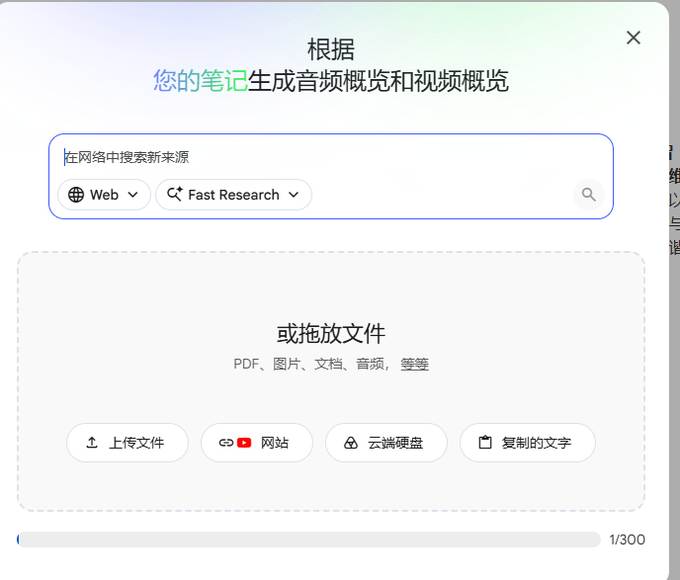
2. Add data sources
Upload your PDF file.
Gemini Notebook supports multiple data sources:
- website link
- YouTube video
- audio file
- Google Docs
- Google Slides
After the upload is completed, the AI will automatically read and understand your content.
3. Set video generation parameters
Next, we enter video generation.
You can customize:
video length
Choose according to your needs:
- Short Video (suitable for TikTok, Little Red Book, Video Numbers)
- Long videos (suitable for YouTube and B sites)
video language
You can choose different languages such as Chinese and English.
video highlight
You can tell AI:
I hope the video focuses on what.
For example:
Please focus on refining the investment concept in the book and make it into a book-opening video suitable for ordinary users to understand.
Or:
Please summarize the 10 core life-changing ideas of this book.
visual style
You can choose different video presentation methods.
For example:
- Concise business style
- Education science popularization style
- Animation style
- Speech style
After the settings are complete, click Generate.
Wait a few minutes and a complete video content will come out.
4. What is the generation effect?
Based on actual experience, Gemini Notebooks can be directly generated:
- video structure
- explanatory text
- dubbing
- Picture material
- transition logic
For people who want to create a knowledge-based account, it is equivalent to completing most of the work in the video production process.
Previously:
A book → Hours of editing → Hours of editing.
Now:
A book → upload → a few minutes to generate the first edition.
Of course, AI-generated videos are not the final product.
If you want to improve the quality of your account, you can continue to optimize:
- Modify the first 3 seconds to increase the completion rate
- Adjust the order of opinions
- Add real people's views
- Replace AI dubbing
- Add personal case
AI is more suitable as your content production assistant than a complete replacement for creators.
5. Gemini Notebook is not just about making videos
Many people only pay attention to its video function.
In fact, it is more like a personal AI researcher.
For example:
Learn a new field
Upload:
- industry report
- paper
- books
Let AI help you:
- Summarize the knowledge system
- Refining key concepts
- Generating learning routes
Research a project quickly
For example:
Entrepreneurship research, competitive product analysis, market research.
After uploading relevant data, you can quickly obtain structured analysis.
Develop learning materials
It can also generate:
- mind map
- PPT
- audio course
- study notes
It is of high value to students, researchers, and content creators.
6. Restrictions on free version and membership version
Currently, there is a limit on the number of times the video generation function of Gemini Notebook is used.
Free users can generate a limited number of videos per day.
Pro users have higher quotas.
Some users may choose to purchase shared membership services to reduce costs, but such methods pose risks to account stability and continued availability.
If it is used for commercial creation for a long time, it is recommended to use an official account.
AI is changing the way content is produced
In the past, to create a book-opening account, you needed:
Understand reading, write, edit, and operate.
Now, AI has lowered the production threshold.
An ordinary person can quickly complete it as long as he finds a good book:
Read → Summary → Script → Video.
The competition for content creation in the future may no longer be about who will edit, but who:
- to find better information.
- Ask better questions
- Be able to add your own perspective
Tools will become stronger and stronger, but what is truly valuable is still people's thinking.
The Gemini Notebook is just the beginning.