
Source code github.com/extremeshok/spamassassin-extremeshok_fromreplyto
Description
Configures spamassassin to score mails with various rules against the reply-to, from and to headers. Spam often uses a different From: and Reply-To: Whilst most legitimate email does not. Spam often uses the same From: and To: Whilst most legitimate email does not Same domain checking Logic, will allow for different sub-domains of the same domain name.REQUIRES
spamassassin
INSTALL GUIDE
create the plugin directory.
mkdir /etc/mail/spamassassin/plugins/
Download and save the plugins to /etc/mail/spamassassin/plugins/
Download and save 01_extremeshok_fromreplyto.cf to /etc/mail/spamassassin/01_extremeshok_fromreplyto.cf
Verify the installation with the following command.
spamassassin -D –lint 2>&1 | grep -i failed Verification failed, module is not installed
First, make sure that your computer has a C compiler (e.g. GCC compiler) installed. Because the vast majority of Perl modules are written in Perl, some use C to implement the underlying layer and then use XS to handle interactions. Therefore, you must install a Linux C development environment.
Next, open an interactive interpreter for CPAN and use the following methods to create and install Perl modules
$ sudo perl -MCPAN -e shellcpan> install HTML::Template
Or you can use this method
$ sudo perl -MCPAN -e ‘install HTML::Template’
If the command given above sends the error message "Can't locate CPAN.pm in @INC", the first thing you think of is that you should use the standard Linux package manager command to install CPAN
For CentOS, Fedora or RHEL:
$ sudo yum -y install perl-CPAN
For Ubuntu and Debian:
$ sudo apt-get install perl-modules
You should now be able to manage other Perl modules using the perl -MPCAN command.
Considering that some people use proxy servers, they may need to use CPAN on the proxy server. You can use CPAN's console to configure your proxy server
$ sudo perl -MCPAN -e shellcpan> o conf init /proxy/
After the above command is executed, you will be asked to set up your proxy server. Finally, the system will ask you to confirm whether your configuration is complete.
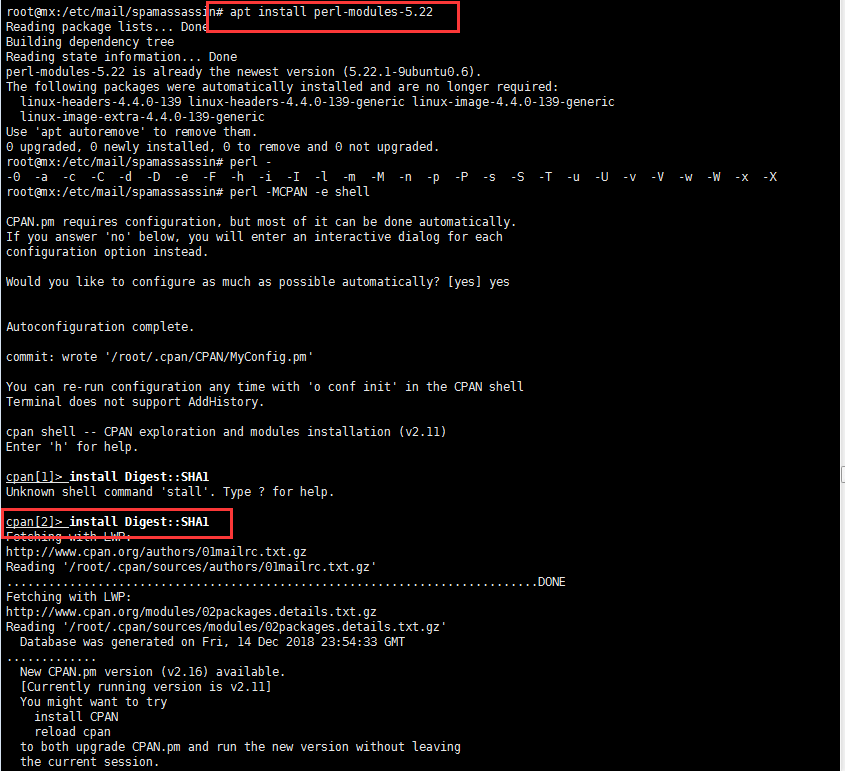
Then install the above installation modules step by step.