
源码https://github.com/extremeshok/spamassassin-extremeshok_fromreplyto
Description
Configures spamassassin to score mails with various rules against the reply-to, from and to headers. Spam often uses a different From: and Reply-To: Whilst most legitimate email does not. Spam often uses the same From: and To: Whilst most legitimate email does not Same domain checking Logic, will allow for different sub-domains of the same domain name.REQUIRES
spamassassin
INSTALL GUIDE
create the plugin directory.
mkdir /etc/mail/spamassassin/plugins/
Download and save the plugins to /etc/mail/spamassassin/plugins/
Download and save 01_extremeshok_fromreplyto.cf to /etc/mail/spamassassin/01_extremeshok_fromreplyto.cf
Verify the installation with the following command.
spamassassin -D –lint 2>&1 | grep -i failed 验证失败,模块未安装
首先,请确认你的电脑安装了C编译器(例如:GCC编译器)。因为绝大多数的Perl模块都是用Perl语言写的,有一些使用C语言实现底层然后用XS语言来负责交互。因此你必须安装Linux C的开发环境。
接下来,打开一个CPAN的交互解释器,用下面的方法来创建和安装Perl模块
$ sudo perl -MCPAN -e shellcpan> install HTML::Template
或者用这个方法亦可以
$ sudo perl -MCPAN -e ‘install HTML::Template’
要是上面的所给的命令发出“Can’t locate CPAN.pm in @INC“的错误提示,你首先想到是应该用标准的Linux包管理器命令来安装CPAN
对于 CentOS, Fedora 或者 RHEL:
$ sudo yum -y install perl-CPAN
对于Ubuntu 和 Debian:
$ sudo apt-get install perl-modules
你现在应该可以用perl -MPCAN命令来管理其它的Perl模块。
考虑到有些人会用到代理服务器,他们就有可能会有在代理服务器上使用CPAN的需求,你可以用CPAN的控制台来配置你的代理服务器
$ sudo perl -MCPAN -e shellcpan> o conf init /proxy/
上面的命令执行完成以后会要求你设置一下你的代理服务器,最后系统会让你确认一下你的配置是否完成。
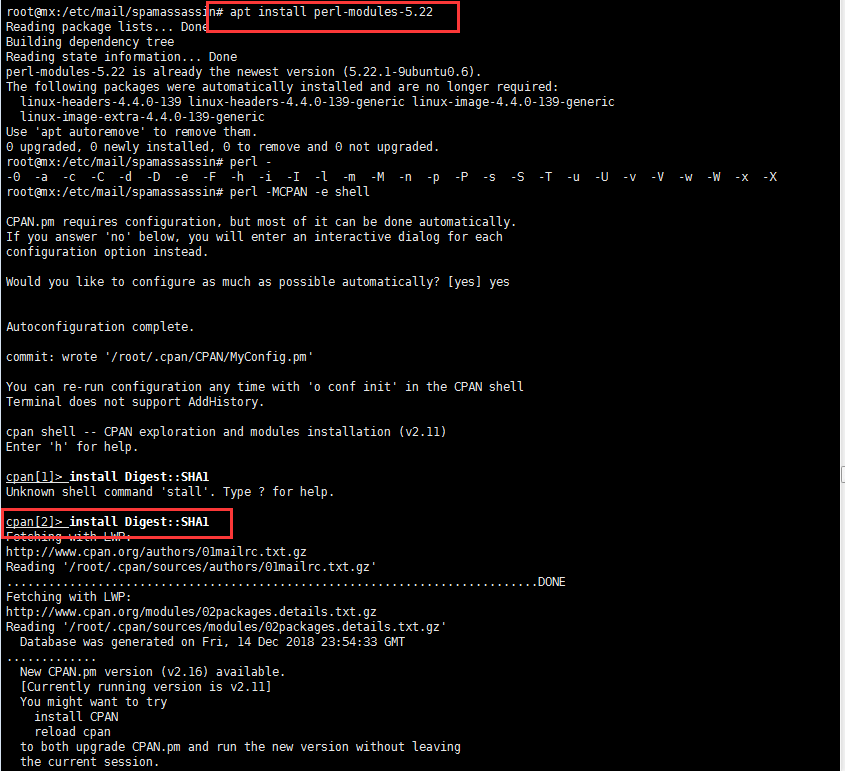
以此类推逐步安装以上为安装模块。