
ソースコードhttps//github.com/extremeshok/spamassassin-extremeshok_fromreplyto
Descriptionの説明
Configures spamassin to score s with ous rules against the reply-to from and to ers. Spam often uses a ent From and Reply-To Whilst most legitimate email does not. Spam often uses the same From and To Whilst most legitimate email does not Same domain checking Logic will allow for different sub-domains of the same domain name.REQUIRES
スパマassin
インスタルガイド
create the plugin directory.
mkdir /etc/mail/spamassin/plugins/
プラグインをダウンロードして/etc/mail/spamassassin/plugins/に保存する
/etc/mail/spamassassin/01_extremeshok_fromreplyto.cfへのダウンロードと保存01_extremeshok_fromreplyto.cf
フォローするコマンドでインストールを確認します。
spamassassin -D lint2>& 1| grep-I失敗した 検証に失敗しました。モジュールがインストールされていません
まず、お使いのコンピュータにCコンパイラ(GCCコンパイラなど)がインストールされていることを確認します。Perlモジュールの大部分はPerlで書かれているため、いくつかはC言語で実装され、XS言語で相互作用する。Linux C開発環境をインストールする必要がある。
次に、CPANインタラクティブインタプリタを開き、Perlモジュールを作成してインストールします。
$ sudo perl-MCPAN-e shellcpan> install HTML Template
この方法でもできます
$ sudo perl-MCPAN-e install HTML Template
上記のコマンドが“Can t locate CPAN.pm in @INC”というエラーメッセージを表示した場合、最初に標準のLinuxパッケージマネージャコマンドを使用してCPANをインストールする必要があると考えます。
CentOS、Fedora、またはRHELの場合
$ sudo yum-y install perl-CPAN
UbuntuおよびDebianの場合
$ sudo apt-get install perl-modules
これで、perl-MPCANコマンドを使って他のPerlモジュールを管理できるはずです。
プロキシサーバーを使用する人がいることを考えると、プロキシサーバーでCPANを使用する必要がある可能性があります。CPANコンソールを使用してプロキシサーバーを設定できます。
$ sudo perl-MCPAN-e shellcpan> o conf init /proxy/
上記のコマンドが実行されると、プロキシサーバーのセットアップが求められ、最終的に設定が完了したことを確認するよう求められます。
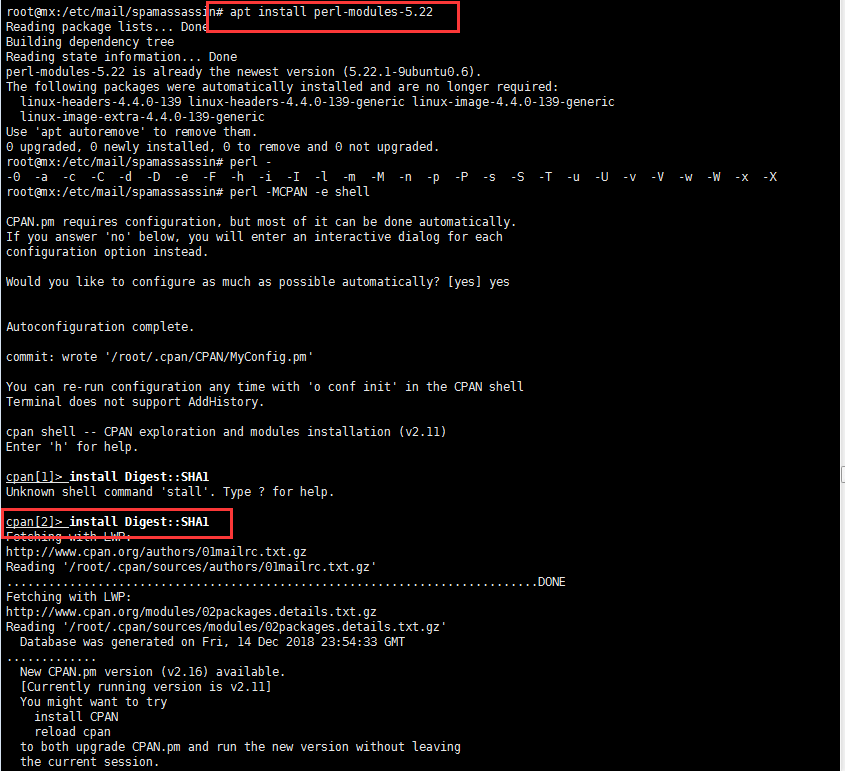
以下のようにステップバイステップインストール上記をインストールモジュールとします。